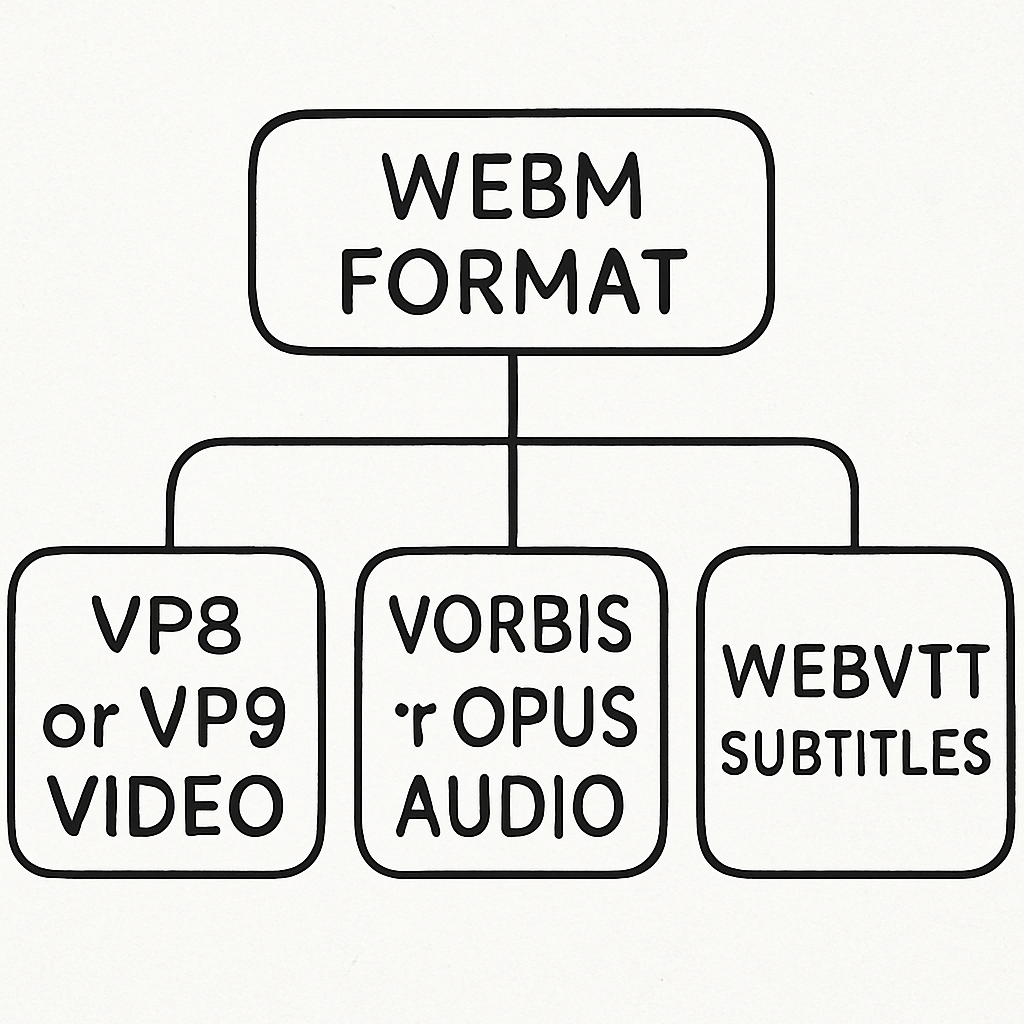
The WebM format is a popular video file format known for its high-quality compression and wide compatibility. Whether you’re on a desktop computer, a smartphone, or a tablet, there’s a WebM viewer available for you. This article will guide you through the top WebM viewers for every platform, ensuring you can play your favorite videos without a hitch.
Before diving into the viewers, it’s essential to understand what a WebM format is. WebM is an open, royalty-free multimedia file format designed for the web. It provides a high-quality video experience while keeping file sizes small, making it ideal for streaming and sharing online. Developed by Google, WebM is a part of the broader HTML5 video standard and is supported by all modern web browsers.
Why Use a WebM Viewer?
A WebM viewer, or WebM player, is necessary to play files in this format. While most modern browsers can handle WebM files, dedicated viewers offer additional features such as enhanced playback controls, subtitle support, and better performance on various devices.
Best WebM Viewers for Windows
VLC Media Player

VLC Media Player is a versatile and highly popular choice among Windows users. It supports almost every video and audio format, including WebM. With VLC, you get a plethora of features like playback speed control, subtitle synchronization, and customizable skins. It’s an open-source player, so it’s free to use and regularly updated with new features.
PotPlayer
PotPlayer is another excellent choice for Windows users. It provides a smooth playback experience with support for WebM and other video formats. The player boasts advanced features like 3D viewing, screen capture, and extensive customization options. Its lightweight design ensures that it runs efficiently, even on older machines.
Top WebM Viewers for macOS
QuickTime Player with Perian
QuickTime Player is the default media player for macOS, and with the addition of the Perian plugin, it can support WebM files. Perian is a free, open-source plugin that extends QuickTime’s capabilities, allowing it to handle various video formats, including WebM.
IINA
IINA is a modern media player built specifically for macOS. It supports WebM files natively and offers a sleek, intuitive interface. IINA integrates well with macOS features like Touch Bar and Force Touch, providing a seamless experience. It also supports a wide range of video and audio formats, making it a versatile choice for Mac users.
Best WebM Viewers for Linux
SMPlayer
SMPlayer is a cross-platform media player that works exceptionally well on Linux. It supports WebM files and includes features like playback speed control, audio and subtitle synchronization, and a built-in YouTube browser. SMPlayer is based on the MPlayer engine, ensuring excellent performance and compatibility with a wide range of formats.
MPV Player
MPV Player is a free, open-source media player that supports WebM and many other formats. It is known for its minimalist design and high-quality video output. MPV Player offers advanced features like hardware acceleration, making it a great choice for users who demand performance and efficiency.
Top WebM Viewers for Android
MX Player
MX Player is a highly popular video player for Android devices. It supports WebM files and offers features like hardware acceleration, subtitle support, and gesture controls. MX Player’s user-friendly interface and robust performance make it a top choice for Android users.
VLC for Android
VLC for Android brings the versatility of the desktop version to mobile devices. It supports WebM files and offers a range of features, including network streaming, subtitle synchronization, and audio control. VLC’s open-source nature ensures regular updates and improvements.
Best WebM Viewers for iOS
PlayerXtreme Media Player
PlayerXtreme Media Player is a powerful video player for iOS devices. It supports WebM files and offers features like hardware acceleration, subtitle support, and password protection for your media library. PlayerXtreme’s sleek interface and extensive format support make it a top choice for iPhone and iPad users.
nPlayer Lite
nPlayer Lite is a versatile media player for iOS that supports WebM and other video formats. It offers features like streaming from network devices, customizable playback controls, and support for various subtitle formats. nPlayer Lite’s intuitive interface and robust performance make it a great option for iOS users.
WebM Viewers for Browsers
Google Chrome
Google Chrome natively supports WebM files, making it an excellent choice for those who prefer browser-based viewing. Simply drag and drop your WebM file into a new tab, and it will play without any additional plugins or extensions.
Mozilla Firefox
Mozilla Firefox also supports WebM files out of the box. Like Chrome, you can play WebM files by dragging them into a new tab. Firefox’s open-source nature ensures that it remains a reliable option for playing WebM files.
Conclusion
Whether you’re using a Windows PC, a Mac, a Linux machine, or a mobile device, there’s a WebM viewer available for you. With the options listed above, you can enjoy your favorite videos in the WebM format without any hassle. Choose the viewer that best fits your needs and enjoy high-quality video playback across all your devices.